 Skip to content


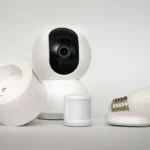
Setting up an automated living room doesn’t have to cost thousands or require expensive hubs. Many of the most useful upgrades can be done with simple, Budget-Friendly Smart Devices that cost under $100 and can be installed in minutes. Whether you want voice-controlled lamps, energy-saving routines, or extra comfort, this guide will help you confidently choose the right gadgets.Below are five budget-friendly smart devices available on Amazon and AliExpress that are practical, reliable, and perfect for living room automation.
1. TP-Link Tapo P100 – A Small Smart Plug with Big Impact

The TP‑Link Tapo P100 smart plug offers seamless plug-and-play functionality, allowing you to turn ordinary lamps, fans or small appliances into voice-controlled smart devices in minutes. It supports both Alexa and Google Assistant for hands-free control, and its compact design ensures your second outlet remains free. Ideal for beginners, it’s one of the most reliable and cost-effective ways to start automating your living room.
- Ultra-easy setup
- Compact design that doesn’t block neighboring outlets
- Solid app experience and dependable schedules
- Excellent price-to-value ratio
- No built-in energy monitoring
- Not ideal for high-power appliances
If you’ve never tried home automation before, a smart plug is the most forgiving entry point. The TP-Link Tapo P100 is a tiny plug that turns any ordinary device into a smart one. Plug in a lamp, a fan, or even a small humidifier, and suddenly your living room responds to schedules and voice commands.
Why it’s great for the living room:
The P100 allows you to create cozy evening lighting routines, automate holiday lights, or ensure devices are off when you leave. It integrates smoothly with Alexa and Google Assistant, so you don’t even need to open the app — just say the command.
2. GHome Smart Plug WP3-A – Real Energy Monitoring That Saves Money

The GHome Smart Plug WP3-A is a compact Wi-Fi outlet that supports voice control with both Amazon Alexa and Google Assistant, turning almost any device into part of your smart home. It allows remote app control, scheduling, and grouping of appliances, making it one of the go-to Budget-Friendly Smart Devices for living-room automation. Just note that it supports only the 2.4 GHz Wi-Fi band, so you’ll need to ensure your router is set accordingly.
- Works with both Amazon Alexa and Google Assistant, enabling voice control of connected devices
- upports remote app control, timers and scheduling via the mobile app (Smart Life / Tuya or GHome App)
- No hub required – it uses a direct 2.4 GHz Wi-Fi connection for setup and control, making it one of the easier Budget-Friendly Smart Devices to install
- Compact design and sharing/group control features
- not ideal for very high-power appliances
- Requires indoor use only
If you want more than simple on/off automation, the GHome Smart Plug WP3-A is your best friend. This smart plug includes real-time energy monitoring, letting you track how much power a device consumes.
Living room use case:
Plug your TV, stereo, or gaming console into the WP3-A. You’ll quickly learn how much each device consumes and can create schedules or auto-power-offs to cut waste. This makes the Gosund SP111 one of the most meaningful budget-friendly smart devices for homeowners who want savings and convenience.
3. Sonoff Basic R4 – Hidden Automation You Don’t Even See

The Sonoff Basic R4 is a Wi-Fi smart relay switch powered by the ESP32 chip, designed to slip behind an existing wall switch or device to add remote and voice control via the eWeLink app. It supports Magic Switch mode — meaning you can still manually operate a physical switch while automation remains active — making it a great choice for DIY living-room upgrades.
- Very inexpensive automation hardware
- Integrates with the eWeLink ecosystem
- Can be paired with sensors or scenes
- Ideal for “invisible” smart installs
- Requires basic wiring know-how
- Firmware updates occasionally need attention
If you’re comfortable with a little DIY or have someone to help, the Sonoff Basic R4 gives you more power than any plug-in device. This tiny relay sits behind your wall switch or inside a device enclosure, allowing you to automate the circuit itself. That means your wall switch still works manually, while the smart connection adds schedules and remote control.
Living room use case:
One popular setup is installing the R3 behind a floor lamp switch. Your décor remains untouched, but now your living room lamp responds to voice commands and turns off automatically at night.
4. Wyze Smart Bulb (White or Color) – Quick Lighting Magic

The Wyze Smart Bulb delivers up to 1100 lumens, supports 16 million colors and tunable white (1800 K-6500 K), and works with Alexa, Google Assistant and IFTTT — no hub required. It’s an excellent Budget-Friendly Smart Device for the living room, letting you set lighting scenes (movie night, ambient back-lighting, reading mode) with ease.
- No hub required
- Great brightness for the cost
- Simple mobile app with routines and scenes
- Solid reliability for everyday use
- Wi-Fi only, no Zigbee or Thread mesh
- Color accuracy isn’t “studio-grade,” but fine for home use
Lighting completely transforms a living room. The Wyze Smart Bulb delivers bright, tunable light and color modes without a hub. If your living room has table lamps, floor lamps, or ceiling fixtures with standard sockets, this is a one-minute upgrade.
Living room use case:
Set the bulb to a warm tone for movie nights, a daylight setting in the afternoon, or schedule a soft start at sunrise. If you’re new to automation, lighting is one of the most satisfying places to start — and this bulb makes it effortless.
5. Yeelight (Xiaomi) Smart Bulbs – Premium Feel, Budget Price

The Yeelight smart bulbs offer full-colour RGB and tunable white lighting (from around 1700 K to 6500 K) with built-in WiFi and no hub required, making them an excellent automation upgrade for your living room. They also support voice assistants like Alexa and Google Assistant and allow grouping and scheduling of multiple bulbs — giving you a refined, flexible lighting setup without exceeding your budget.
- Excellent color quality and ambience options
- Competitive LED efficiency
- Excellent for modular room design
- Firmware / region settings may vary
- App may require linking an account
For those who want a more polished lighting ecosystem, Yeelight is a step up. Their bulbs and strips have smoother animations, richer scenes, and wider integration options (like HomeKit on supported models).
Living room use case:
Yeelight is perfect for zone lighting: use one bulb for reading, a color strip behind the TV for ambient glow, and a bright bulb in the ceiling fixture. A few coordinated devices can give your space a premium “smart lounge” feel for far less than $100 per piece.
Why Budget-Friendly Smart Devices Shine in the Living Room
The living room is the heart of your home — entertainment, guests, relaxation, and even occasional work. Budget-friendly smart devices allow you to automate core comfort zones without needing hubs, gateways, or high-end wiring.
Here’s what you can do almost instantly:
- One-tap movie mode: dim the lights and power the TV using a scene.
- Work mode: bright daylight bulbs + desk fan on a timer.
- Eco mode: smart plugs kill idle power during sleep hours.
You get better comfort and reduce waste — which pays you back over time.
Tips from a Smart Home Pro
Start with what you use most.
Ask yourself: What annoys me in my living room? A lamp you forget to turn off? A media setup that drinks power for no reason? Choose one problem and fix it with a single Budget-Friendly Smart Device.
Choose one app ecosystem to begin.
Tapo, Smart Life, eWeLink, Wyze, Yeelight — stick to one at first. It’s easier to learn automation when all settings are in one place.
Combine simple automations into scenes.
Once you’re comfortable, connect devices:
Example — Movie Time:
- Turn on the ambient LED strip at 15%
- Switch off the reading lamp
- Turn the TV outlet on
Automation doesn’t have to be fancy. It just has to work for your lifestyle.
Troubleshooting & FAQs
Are cheap smart devices secure?
Reputable brands tend to provide firmware updates and clearer privacy policies. Keep apps and firmware current, use strong passwords, and avoid suspicious sellers.
Do smart devices work offline?
Many rely on the cloud for features, though some provide basic local control. If local-only control is essential, research device specs or community firmware options.
Can I mix vendors?
Yes — most manufacturers integrate with Alexa or Google Assistant, so you can control different-brand devices together in routines.
Want to Go Further?
Once you’ve mastered plugs and bulbs, these articles will help you level up:
- How to Monitor Your Energy Usage with Smart Meters — practical ways to cut everyday waste using smart plugs, sensors, and energy monitors.
- How to automate Your Home in One Weekend — step-by-step guide to turn basic gadgets into a real smart system.
- How Smart Plugs Reduce Your Energy Bills — real-world examples of plug automation saving money.
- Best Smart Power Strip to Save Money in 2025: Top Picks from Amazon & AliExpress — ideal when your living room has a TV, console, receiver, soundbar, and more.
- 5 Smart Lighting Setups That Pay for Themselves — how light placement pays back in comfort and energy savings.
Final Thoughts
Automating your living room doesn’t require expensive hubs or engineering skills. With a handful of budget-friendly smart devices, you can make your favorite space brighter, safer, and more comfortable in just an afternoon. Start with a plug or a smart bulb, build simple routines you’ll actually use, and when you’re ready — expand.






Аплодирую за полный обзор, сам только что исследовал
этот вопрос.